hackathon
Additional material and support for hackathon events

Card as a Service API
Card as a Service (CaaS) API provides companies with the ability to create technology to instantly provision virtual corporate cards into a user’s mobile wallet. It includes the ability to assign cards and review card usage. [API documentation]
Features
These APIs enable users to create, provision/distribute, and manage the virtual payment cards that are made available through the CaaS technology.
With these APIs, users of CaaS are able to:
- Create a Virtual Card
- Provision a Virtual Card to a specific User for use
- Check the available balance on a card after it has been created
- Retrieve detailed information about the cards that have been provisioned and the details on individual cards.
- Retrieve the security codes for individual cards
- Close and Cancel the virtual cards
- Payoff the virtual cards
Using these APIs and features, in conjunction with the other available APIs hosted for the hackathon, a participating team can emulate the technology that will be available to companies and individuals looking to build CaaS into their technology, as well as managing the funds that are made available through the credit program that will sit behind the technology.
Workflow
Before using the CAAS APIs, it is important to understand the general data model that supports the virtual card ecosystem.
This collection of APIs is used for creating a pool of virtual cards that may be distributed to a groups of users (e.g. employees, contractors or even customers). It is based on the idea that there is a company entity responsible for managing and distributing these cards.
In order to use this API, you will need to obtain a unique company account ID. The company account is analogous to a customer record and already has a line of credit (LOC) account associated with it. The LOC account is used to fund the virtual cards.
The company account also has a pool of unassigned virtual cards that you will use as part of your solution.
When you assign a new virtual card, the backend will create a new credit card account for this virtual card. This is the account that will be used for making card purchases. The LOC account serves as the payment account (or parent) for the card account because it is actually responsible for it. However, the card transactions will be listed under the card account.
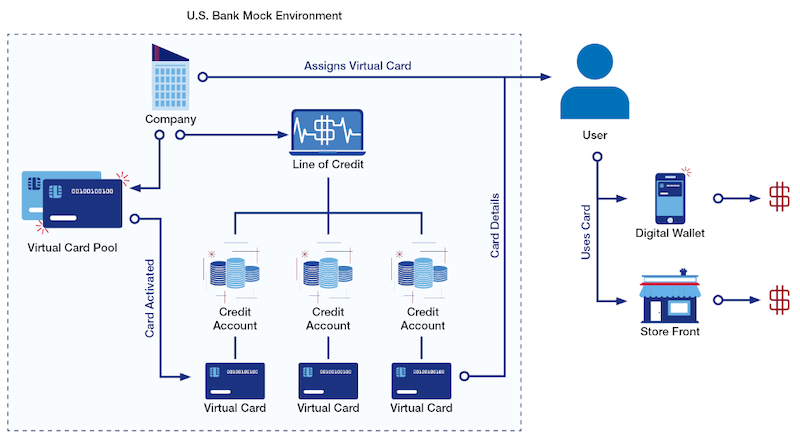
The company details are available in the /company/{companyID} method. This will show you pertinent information about the company as well as the general status of the cards (e.g. the number of total cards, the number of assigned cards).
The LOC account details are available in the /company/{companyID}/account method. This will show you the current balance of the LOC, including the available credit. As you assign a new virtual card, you will allocate a specific amount to each card that will therefore reduce the available credit remaining to allocate to other cards.
Please note that some methods require the companyID while other methods require the LOC accountID.
Use Cases
Customer access to payment processing.
George is a developer who has been tasked with identifying a solution to improve the way that his company is able to create and distribute payment options for their customers within their own technology. His company is looking create a more comprehensive payment solution set within their platform to accompany their existing features that let customers process payments and send invoices. They have been able to improve their customers’ experience with their software by investing in process integration through APIs, and they are looking to continue to provide their customers with amazing features!
Integrate software into business processes.
Stephanie is a product manager who has been tasked with evaluating feedback from customers on desired product features that align with her company’s current strategy reduce churn and increase overall net revenue retention. She is looking at features that not only delight their customers while not requiring a lot of development work on her team, but she is focused on choosing roadmap items that further integrate her software into customers’ business processes - making her company more sticky. She has determined that the CaaS product checks both of those boxes, and she is now working with her team to build the available CaaS APIs into her technology and begin marketing the upcoming features to her customers.
Extend payment options.
Carl is a VP of Customer Experience for a company that is trying to find solutions to solve what their customers have always complained to them about - expense reimbursement. Many of the services that they provide to their customers require for customers to incur personal expenses, and they want to instead move towards a more controllable method to deliver payment options for their customers that removes some of the friction involved with using these services. He has found the CaaS solution to be compelling because it extends a payment option to customers that does not require them to float any expense that would be reimbursed, has the controls that he is familiar with for typical corporate credit, and allows his company to earn rebate through the credit program that they otherwise would not earn.
FAQs
Q. How much money is in the Line of Credit Account?
Each LOC account is initially funded with $500,000.
Q. How can I find my LOC accountID?
The LOC account ID can be found by calling the /company/{companyID}/account method using the companyID that you were given. In the resulting JSON payload, you will see the it listed as the accountID - you should note that the same value is listed in the paymentAccountID field. This is because the LOC account is also its parent account.
Note: the accountType is listed as LOC for Line of Credit.
Q. What do the various balances mean in the LOC account record?
There are several balances listed in the balances object.
- lineOfCredit - the total amount of credit assigned to this LOC account.
- availableCredit - the amount of credit that is still available to be disbursed to new virtual cards
- allocatedActiveBalance - the amount of credit that has been assigned to all active cards so far
- allocatedPendingBalance - the amount of credit that has been allocated to cards that have not yet been activated. (This field will be zero since cards are immediately activated upon creation)
- actualClosedBalance - the amount that has been spent by cards that have been closed (but not paid off).
- outstandingPurchases - this is a running total of purchases that have been made by all the virtual cards in the pool.
Note: the availableCredit, allocatedActiveBalance, allocatedPendingBalance and actualClosedBalance will add up to the lineOfCredit.
Q. What do I need to do to create a virtual card?
You will use the /vcard (POST) method to create a virtual card. At minimum, you will need to provide the following data:
- amount - the amount to fund the card
- paymentAccountID - the account ID for the LOC account which will be providing the funds for this new card
- effectiveUntil - basically, the expiration date for this card. Virtual cards are only available for a maximum of one year after creation.
- firstName - the first name of the person to whom this card is assigned
- lastName - the last name of the person to whom this card is assigned
You will see that there are several optional fields also described in the API specifications.
Q. What is the Card Info used for in the virtual card record?
The card info contains the personal information about the person to whom the virtual card is assigned (firstName, lastName, email, and phone). Additionally, it includes company-specific assignments that are used for internal bookkeeping.
For example, a construction company could assign specific cards to different building projects (using different project IDs) and would be able to aggregate all of the purchases made for each project. Similarly, a marketing company could issue virtual cards to several people who are working at a particular event (using event ID).
Q. How do I find a list of all of my virtual cards?
You can find all of your virtual cards by using the /account/{accountID}/cards/{status} method where the accountID is the account ID for your LOC account.
Please note that the search is based on the card status. This enables you to quickly see all of your active cards. The possible values for status are: ACTIVE, CLOSED, CANCELLED.
Q. How can I use a virtual card for a purchase?
There are two ways to use a virtual card to make a purchase. Both methods are available in the Money Movement API
-
/activity/card-purchase- traditional purchase with a merchant (in person or online). You will need all of the card-related information (card number, expiration date, zip, cvv, etc). This information can be obtained by using the/vcards/{cardID}/detailsmethod. -
/activity/digital-wallet- through a digital wallet. The virtual card must first be packaged for a digital wallet.
Q. How do I package a virtual card to a digital wallet?
The CAAS APIs provide a mechanism for emulating the insertion of a virtual card into a digital wallet: /cards/{cardID}/digital-wallet/google-pay (Google Pay) or /cards/{cardID}/digital-wallet/apple-pay (Apple Pay).
However, the card cannot actually be inserted into a real digital wallet because it is simply a test account and therefore cannot really be used for a purchase. Instead, the Money Movement API has a method for you to emulate a purchase using a digital wallet.
When you package a virtual card, you will also need to provide a device ID and a wallet ID which correspond to the device type and your application’s specific wallet ID, respectively. Because this is an emulation, you can use any values for these parameters (as long as you meet the required syntax). However, you will need to provide the same wallet ID when you make a purchase via the digital wallet.
Q. Can virtual cards be reused?
No. Once a virtual card has been assigned to a specific individual, it cannot be reassigned to another person. The virtual card can only be closed or cancelled.
Q. What is the difference between closing and cancelling a card?
This corresponds to the two methods:
/vcards/{cardID}/close/vcards/{cardID}/cancel
Both of these actions will stop a virtual card from being used again by setting its status to closed; however, the conditions for using them differ.
Once a virtual card has been used to make a purchase, it can only be closed. If the card has never been used, then the card can be cancelled. Therefore, if you try to cancel a card that has been previously used, you will get an error.
When you close a card that has been previously used, the amount of unused balance will be returned to the available credit for the LOC account while the amount that has been used will be reflected in the actualClosedBalance field.
Q. How can I look at the purchases for a specific virtual card?
You can find all the transactions for a given virtual card by using the methods available in the Core Banking APIs.
Every virtual card is associated with a real credit card account. Just use the method /account/{accountID}/trans/{type} in the Core Banking API where the value for accountID is equal to the cardID.
Q. How can I search for purchases for a specific project/event/customer etc?
In order to find purchases associated with the parameters set in the card info section, you can use the /company/transactions/search method. The API specifications describe the details of the required parameters.
Q. How do I find all the card info values?
As more virtual cards get created, it is possible to not remember all of the different events and projects to which they have been assigned. Fortunately, there is a helper method to retrieve the card info values that you have previously set.
The /{companyID}/card-info method will provide you with an array of objects organized by card info type.
Q. How do I pay off a virtual card?
When a virtual card has been closed, its outstanding balance can be paid off. This is analogous to making a payment to the Line of Credit account itself which will then increase its availableCredit and reduce its actualClosedBalance. It will also reduce the amount of the outstandingPurchases field.
To pay off a virtual card, you will use the /account/make-payment method. This method takes three parameters:
- cardID - the card account ID associated with the virtual card to be paid off
- externalAccountID - the account number of an external account from which the funds will be transferred
- routingNumber - the routing number of the financial institution where this account resides.
In this implementation, there is no actual interaction with an external institution so the values for externalAccountID and routingNumber can be anything.
Note: the Money Movement API also provides a method for making a credit card payment. This method, however, is for accounts that have perpetual credit; virtual cards are only loaded once with a balance so this method will not work. You must use the payoff method in the CAAS API.